Letting a cat out of
the photo frame
A transparent image, a separate frame and a little shadow. How the small pictures on our website gained depth — without a 3D model.
Straight to the codeIt started with an awkward crop
The moving strip on Kotka.dev had tiny cropped photographs: eyes, whiskers, ears, a tail. Some crops felt cramped. The question was simple: could those pictures come out of their frames? We kept the photographic look and separated the subject from the backing.
Compare the same transparent image in two containers. On the left it is clipped; on the right its ears and silhouette can cross the frame. This is layered 2D — an impression of depth, not real 3D.
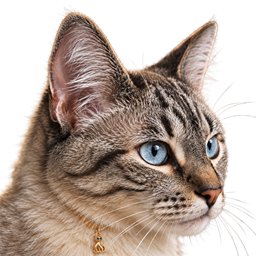
On a mouse, the right-hand cat also lifts slightly on hover. With reduced motion, the depth remains but the movement does not.
Three pieces, not one flat picture
- A transparent subject
The background must actually be transparent. A JPG, or a checkerboard painted into a PNG, will still cover the frame. Inspect the edge on both dark and light backgrounds. - A separate backing
The frame is a pseudo-element behind the image. Its rounded corners do not need to clip the subject. A small rotation makes the separation easier to see. - A shadow that follows the shape
filter: drop-shadow()uses the image’s alpha shape.box-shadowfollows the element’s box. For ears and whiskers, that distinction matters. MDN: drop-shadow()
The smallest useful recipe
This is the component used in the comparison above. Replace the image path with your own transparent asset. Its dimensions and offsets fit our square cutout; another silhouette may need different values. Leave space around it for the protruding parts.
HTML
<div class="pop-frame">
  <img class="pop-subject"
    src="assets/img/detail-ears-cutout-v1.png"
    width="256" height="256"
    alt="Kotka peeking over a frame">
</div>
CSS · frame, shadow and optional motion
.pop-frame {
  position: relative;
  width: 144px;
  height: 120px;
  margin: 36px auto 24px;
  isolation: isolate;
  overflow: visible;
}
.pop-frame::before {
  content: "";
  position: absolute;
  inset: 0;
  z-index: 0;
  border: 1px solid #c9a46b;
  border-radius: 18px;
  background: #1a2634;
  transform: rotate(-5deg);
}
.pop-subject {
  position: absolute;
  z-index: 1;
  width: 168px;
  height: 168px;
  max-width: none;
  left: -12px;
  top: -32px;
  object-fit: contain;
  filter: drop-shadow(0 8px 6px #0008);
}
@media (hover: hover) and (pointer: fine)
  and (prefers-reduced-motion: no-preference) {
  .pop-subject {
    transition: transform .25s ease;
  }
  .pop-frame:hover .pop-subject {
    transform: translateY(-3px) rotate(-2deg);
  }
}
The image sits above the pseudo-element using z-index. isolation: isolate keeps their stacking local to this component; it does not undo clipping. The image’s fixed square box plus object-fit: contain avoids cutting off its contents.
Where the ears disappear
If the cat is still clipped, inspect its ancestors. overflow: visible on the small frame cannot override overflow: hidden on an outer card. Also, combining overflow-x: hidden with overflow-y: visible makes the latter compute to auto. MDN: overflow
Our moving strip still needs clipping at its outer edges. We did not remove that boundary: we increased the vertical padding so the ears, tail and shadows fit inside it. The small frame stays open; the whole strip keeps its limits.
Movement is optional. The media query enables it only for a hover-capable fine pointer with no reduced-motion preference. On touch, the static layers still communicate depth. MDN: prefers-reduced-motion
Before calling it finished
- Check the silhouette and shadow at the actual display size, not only on an enlarged preview.
- Test a narrow screen and reduced motion; nothing important should depend on hover.
- Leave breathing room so the image does not cover a caption, link or neighbouring card.
- Use a meaningful alt text for meaningful images. If a caption already communicates the same thing and the image is decorative, use an empty alt.
- Check asset weight. Our marquee foregrounds are 256 × 256 PNGs for roughly 76–80 px image boxes; the full-size generation masters are not served in the strip.
The trick is in the layers
The result did not require turning Kotka into a plastic 3D character. Giving the photographic silhouette a separate frame, a little space and a suitable shadow was enough. The useful part of this technique is not the cat: it is understanding which layer may cross which boundary.
See the miniatures on our homepage